SSL Certs#
Future services on my box will require Transport Layer Security (TLS).
For this, I’ll need to generate some SSL certificates.
OpenSSL#
This free, open-source tool came with my Debian install.
It’ll work, though its a bit arcane.
I follow along with a youtube tutorial here.
Certificate Authority#
CAs (certificate authorities) vouch for the identity / ownership of SSL certs.
I can create my own CA and sign my own certs for my private LAN.
CA Private Key#
I start by generating a private key for my CA.
It will be encrypted with aes256 and require a password each time I want to use it to sign something.

CA Cert#
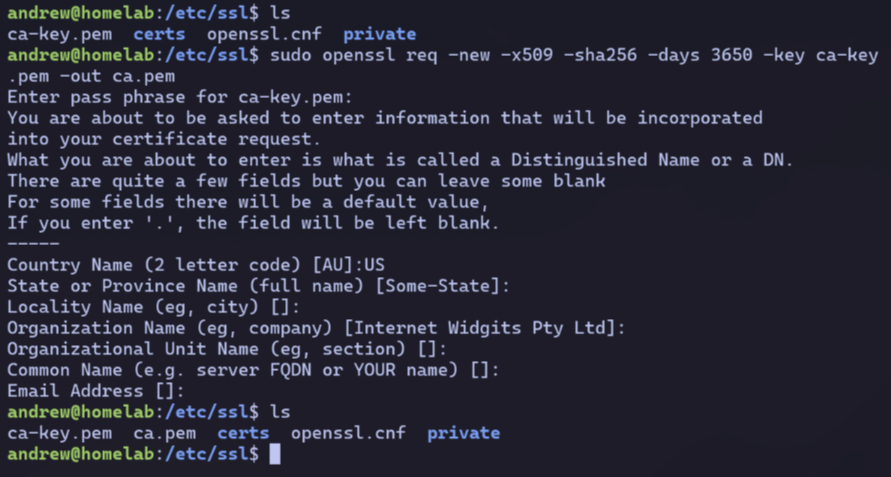
Using the private key, I then generate a cert for my CA.
For convenience, I set the expiration to 10 years.
Server Cert & Key#
The key and the cert will be linked, just like for the CA.
However, I’ll need to create a Cert Sign Request first so my CA can sign and vouch for my identity.
Private Key + Cert Sign Request#
I create both a new private key + a certificate sign request in a single command.

homelab.keywill be my server’s private keyhomelab.csrwill be my cert sign request.- My SANs are “*.homelab.lan” and “homelab.lan” to cover both root and subdomains.
I specify those same SANs as line in a new extfile.cnf file as it will help in the next step:
subjectAltName=DNS:*.homelab.lan,DNS:homelab.lan
Signing the Cert#
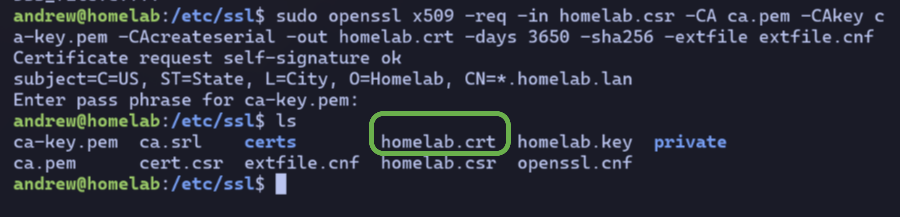
Now I can use my CA to sign the cert passing in my CSR and that extfile.cnf as inputs.
A homelab.crt is the ouput, which is also valid for 10 years.
Full Chain Cert#
The homelab.crt on its own is not enough.
I need to append the CA cert and create a “full chain” showing which CA signed it.
The full chain is created by just appending with sudo cat ca.pem >> homelab.crt.
Cleanup#
I move my cert and private key into their corresponding dirs.
sudo mv homelab.crt /etc/ssl/certs
sudo mv homelab.key /etc/ssl/private
CA Trust#
Last step is to add my CA’s cert to my laptop’s trusted list.
I sftp the ca.pem file to my laptop,
then move it to /etc/ca-certificates/trust-source/anchors/homelab-ca.crt.
Running sudo update-ca-trust extract tells my system to reload the trusted list.

Phew! Tedious, but soon to be worth it to have TLS.